
Discover the best ergonomic mouse for wrist pain in 2026. Compare top wireless ergonomic mice that improve comfort, reduce strain, and boost productivity while working from home.
If you spend hours every day working at a computer, your mouse could be contributing to wrist pain, hand fatigue, and even shoulder discomfort. A traditional mouse forces your wrist into an unnatural position, which may lead to repetitive strain over time.
An ergonomic mouse is designed to support a more natural hand position, reducing stress on your wrist while improving comfort during long work sessions. Whether you’re working from home, gaming, editing photos, or simply browsing the web, upgrading your mouse can make a noticeable difference.
In this guide, we’ll compare the best ergonomic mice available in 2026, explain what features matter most, and help you choose the right model for your workspace.
Quick Comparison Table
| Product | Connection | Best For |
|---|---|---|
| Logitech MX Vertical | Bluetooth / USB | Overall Best |
| Logitech Lift Vertical Mouse | Bluetooth / USB | Small to Medium Hands |
| Anker Wireless Vertical Mouse | 2.4GHz Wireless | Best Budget Pick |
| DeLUX Ergonomic Vertical Mouse | Bluetooth / USB | Large Hands |
| Lekvey Vertical Mouse | Wireless | Everyday Office Use |
| J-Tech Digital Ergonomic Mouse | Wired | Heavy Daily Use |
Why Choose an Ergonomic Mouse?
Unlike traditional mice, ergonomic models position your hand in a handshake-like posture. This reduces twisting of the forearm and helps relieve pressure on muscles and tendons.
Benefits include:
- Reduced wrist strain
- Better hand positioning
- Improved comfort during long workdays
- Less shoulder fatigue
- More natural arm movement
- Better posture when paired with an ergonomic keyboard
Many users report feeling less fatigue after switching to a vertical ergonomic mouse.
What to Look for Before Buying
Comfortable Grip
Choose a mouse that fits your hand size comfortably. A mouse that’s too small or too large can reduce ergonomic benefits.
Adjustable DPI
DPI controls cursor sensitivity. Higher DPI allows the cursor to move farther with less hand movement.
Common settings include:
- 800 DPI
- 1200 DPI
- 1600 DPI
- 2400 DPI
Wireless vs Wired
Wireless mice reduce cable clutter and provide greater flexibility.
Wired models offer reliable performance without worrying about battery life.
Battery Life
Rechargeable batteries are convenient, while replaceable AA batteries often last for months.
Programmable Buttons
Extra buttons can improve productivity by allowing quick shortcuts for copy, paste, browser navigation, or editing software.
Best Ergonomic Mice in 2026
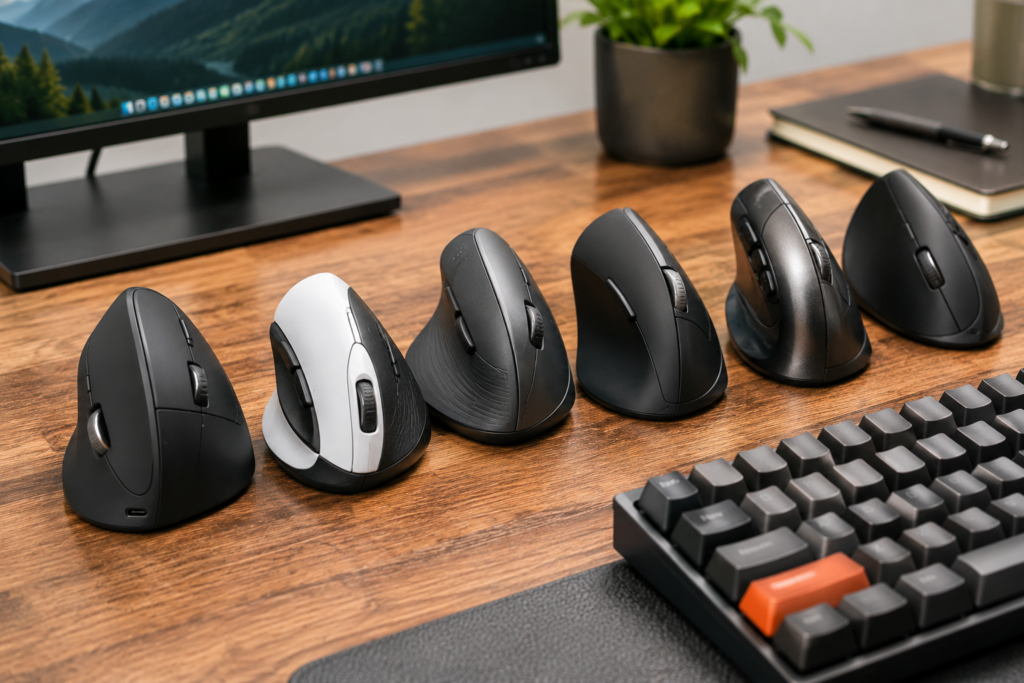
1. Logitech MX Vertical – Best Overall
The Logitech MX Vertical remains one of the most recommended ergonomic mice for professionals.
Pros
- Excellent build quality
- Comfortable vertical grip
- Rechargeable battery
- Bluetooth and USB receiver
- Precise tracking
Cons
- Premium price
- Larger size may not fit small hands
Best for: Professionals and remote workers.
2. Logitech Lift Vertical Mouse – Best for Smaller Hands
The Logitech Lift features a slightly smaller design that’s perfect for users with small to medium-sized hands.
Pros
- Extremely comfortable
- Quiet buttons
- Long battery life
- Excellent software support
Cons
- Not ideal for very large hands
Best for: Office workers and students.
3. Anker Wireless Vertical Mouse – Best Budget Pick
Anker delivers impressive comfort at an affordable price.
Pros
- Excellent value
- Comfortable grip
- Reliable wireless connection
- Easy setup
Cons
- Uses AA batteries
- Fewer customization options
Best for: Budget-conscious shoppers.
4. DeLUX Ergonomic Vertical Mouse
Designed for larger hands, the DeLUX offers adjustable DPI and a comfortable thumb rest.
Pros
- Great ergonomics
- Rechargeable
- Adjustable sensitivity
- Comfortable for all-day use
Cons
- Learning curve for first-time users
5. Lekvey Vertical Mouse
A simple, affordable ergonomic mouse for everyday office work.
Pros
- Lightweight
- Comfortable grip
- Good battery life
- Easy to use
Cons
- Basic software
6. J-Tech Digital Ergonomic Mouse
This wired option is ideal for users who prefer a stable connection.
Pros
- Reliable wired connection
- Comfortable wrist support
- Durable construction
Cons
- Cable limits mobility
How Long Does It Take to Adjust?
Most people adapt to a vertical mouse within a few days.
Initially, movement may feel unusual, but many users quickly find it more comfortable than a traditional mouse.
Tips to Reduce Wrist Pain
An ergonomic mouse works best when combined with healthy workstation habits.
Consider these tips:
- Keep your elbow close to your body.
- Position your mouse near your keyboard.
- Use a properly adjusted office chair.
- Keep your monitor at eye level.
- Take short stretch breaks every hour.
Frequently Asked Questions
Is a vertical mouse really better for your wrist?
Many users find that a vertical mouse reduces wrist strain by keeping the forearm in a more natural position.
Can an ergonomic mouse help with carpal tunnel symptoms?
While it isn’t a medical treatment, an ergonomic mouse may improve comfort for some users by reducing awkward wrist positioning.
Are ergonomic mice good for gaming?
Some gamers prefer traditional gaming mice, but many casual gamers enjoy the comfort of ergonomic models during long sessions.
Final Verdict
If you spend several hours each day using a computer, upgrading to an ergonomic mouse is one of the simplest ways to improve comfort and reduce wrist fatigue.
The Logitech MX Vertical is our top overall recommendation thanks to its premium build quality and excellent ergonomics. For shoppers on a budget, the Anker Wireless Vertical Mouse offers outstanding value without sacrificing comfort.
Pair your ergonomic mouse with a supportive chair, proper monitor height, and a quality keyboard to create a healthier, more productive workspace.
Related Articles
- Best USB-C Docking Stations for Dual Monitors
- Best Standing Desk Converters for Home Offices
- Best Desk Lamps for Eye Strain
- Best Ergonomic Seat Cushions for Long Hours at a Desk
Amazon Products to Feature
- Logitech MX Vertical Wireless Mouse
- Logitech Lift Vertical Ergonomic Mouse
- Anker Wireless Vertical Ergonomic Mouse
- DeLUX Ergonomic Vertical Mouse
- Lekvey Wireless Vertical Mouse
- J-Tech Digital Ergonomic Mouse
As an Amazon Associate, MarketPlazaNow earns from qualifying purchases. This comes at no additional cost to you and helps support our website.