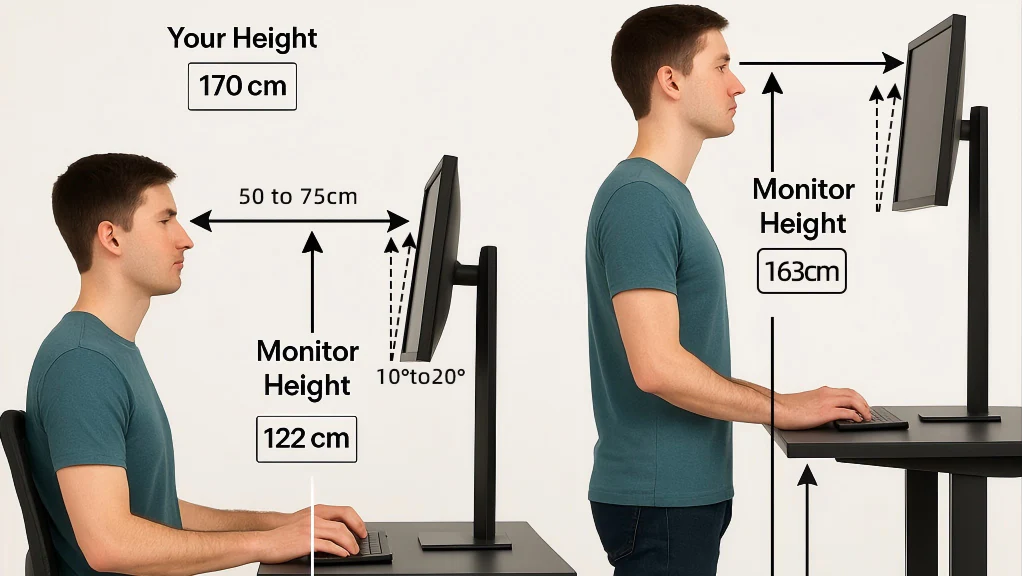
Are you tired of sitting all day while working at your computer?
You’re not alone. Most people now spend 6–10 hours a day at a desk, and over time that can lead to stiffness, low energy, and poor posture. That’s why so many home office workers are upgrading to ergonomic setups that let them alternate between sitting and standing.
Two of the most popular options are a standing desk and a desk converter. They sound similar, but they solve the problem in very different ways — and choosing the wrong one can waste money, space, and patience.
In this guide, we’ll break down the differences, the real pros and cons, and which option is actually worth buying based on your situation and budget.
What Is a Standing Desk?
A standing desk is a full desk that adjusts its height so you can work while either sitting or standing. Instead of staying in one position all day, you can raise or lower your entire workstation whenever you want.
Complete Workstation Replacement
Unlike accessories, a standing desk replaces your entire desk setup. Your monitor, keyboard, and accessories sit directly on an adjustable surface. Many people prefer this option because it looks cleaner, feels sturdier, and is more comfortable for long workdays.
Types of Standing Desks
Electric Standing Desks
Electric models use a motor to raise and lower the desk with a button.
Benefits:
- Quick height changes
- Often includes preset height buttons
- Smooth movement (great for switching often)
- Easy daily use
Manual Crank Standing Desks
Manual desks use a hand crank to adjust the height.
Benefits:
- Lower price than electric desks
- Fewer electronic parts
- Reliable and long-lasting
What Is a Desk Converter?
A desk converter (also called a sit-stand platform) sits on top of your existing desk and lifts your monitor and keyboard upward when you want to stand. It allows you to keep the desk you already have while still getting the benefits of standing.
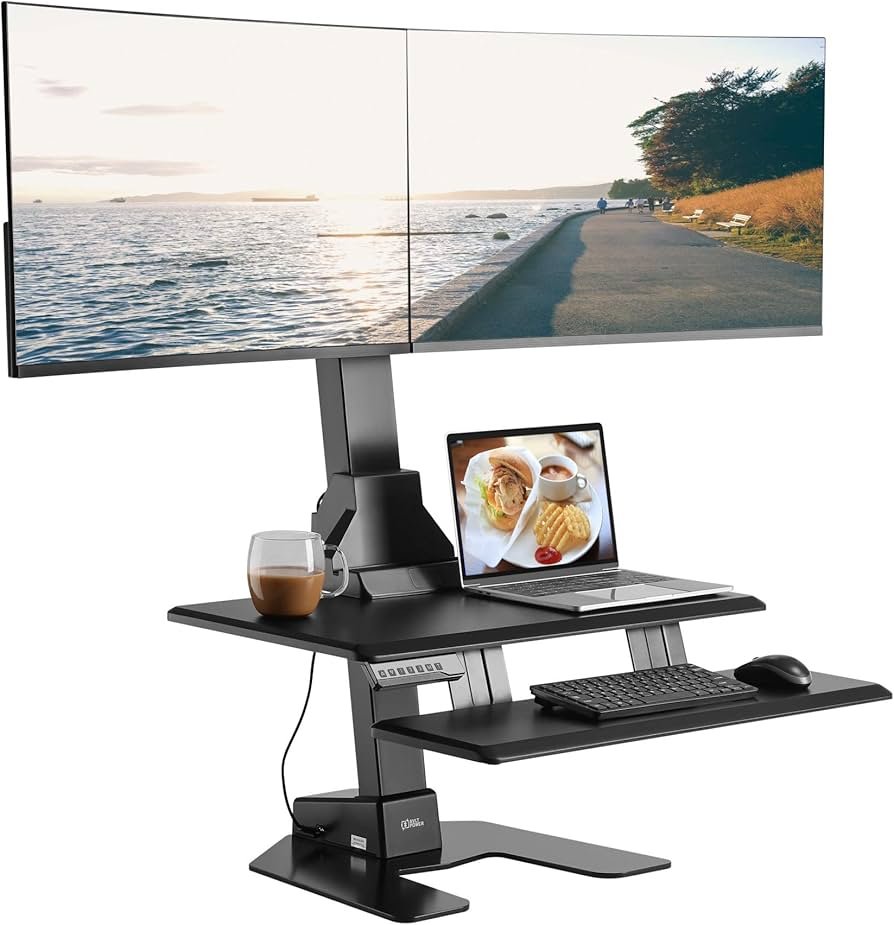
Types of Desk Converters
Spring-Assisted Converters
These require manual lifting but use spring support to help. They’re affordable and simple.
Electric Converters
These raise and lower with a button. They’re more convenient but cost more.
Standing Desk vs Desk Converter: The Real Differences
1) Price
Standing desks typically cost $300–$2,000+ depending on size, brand, and motor quality.
Desk converters usually cost $100–$500.
If you’re building a more comfortable workspace overall, you may also like our helpful home office upgrades for productivity guide.
2) Space Requirements
Standing desks take up more space because they replace your desk completely. They’re best when you have a dedicated home office area.
Desk converters are smaller and sit on your current desk, which makes them ideal for:
- small rooms
- apartments
- shared workspaces
- temporary setups
3) Stability and Weight Capacity
Stability matters more than people think — especially if you use a heavy monitor (or two).
- Standing desks tend to be more stable because they’re built as full workstations.
- Desk converters can wobble if they’re overloaded or built cheaply.
If you use dual monitors, check the weight capacity before buying either option.
4) Adjustment Range and Comfort
Standing desks usually offer a wider adjustment range, which helps you get better posture alignment. Many people also like that the keyboard and monitor move together as one unit.
Desk converters work well too, but some models limit:
- monitor height
- keyboard comfort (depending on the tray)
- elbow position while typing
Key Features to Look For Before You Buy
Ease of Height Adjustment
If you plan to switch positions multiple times daily, electric is usually worth it. If you’ll only adjust occasionally, manual options can still work fine.
Work Surface Space
Make sure your setup has enough room for your actual workflow:
- monitor(s)
- keyboard and mouse
- notebook, phone, or accessories
Keyboard and Monitor Position
A simple comfort rule:
- Monitor should be about arm’s length away
- Top of the screen should sit close to eye level
- Keyboard should be close enough that your elbows stay relaxed (not reaching forward)
Who Should Choose a Standing Desk?
A standing desk is usually the better choice if:
- you work from home most days
- you want a permanent, clean setup
- you use heavier gear (dual monitors, desktop computer)
- you care most about stability and long-term comfort
Who Should Choose a Desk Converter?
A desk converter is usually the better choice if:
- you’re on a tighter budget
- you rent or move often
- your workspace is small
- you want to test standing work before investing in a full desk
Hybrid workers often love desk converters because they’re portable and flexible.
Final Verdict: Which One Is Worth Buying?
If you work from home full-time and want the most stable and comfortable long-term setup, a standing desk is usually worth the investment.
If you want a cheaper option, you’re short on space, or you’re not sure you’ll stand consistently, a desk converter is the smarter starting point.
Either way, standing even 1–2 hours a day (with breaks) can help reduce fatigue and stiffness from sitting too long.
If you’ve decided a full standing desk is the better option, we’re putting together a guide comparing beginner-friendly and budget choices:
→ See our recommended standing desks for home offices
You may also find our guide on improving daily comfort helpful: How to Relieve Lower Back Pain at Home
Affiliate Disclosure
MarketPlazaNow.com participates in affiliate advertising programs. This means we may earn a small commission if you purchase through links on our site, at no extra cost to you. Our recommendations are based on research, product features, and practical usefulness for everyday users.